As technology advances, daily life gets more automated. Home security is no exception. Smart locks have become an increasingly popular choice for homeowners, property managers, and construction managers alike. With features such as remote access, voice commands, and activity logs, smart locks offer a convenient and secure way to control access to your property.
In this article, we will dive into the world of smart locks, exploring how they work, and their benefits and drawbacks. We also cover the best smart locks for remote property and construction management. With them, managers can control job site access from anywhere.
So, whether you manage properties, run job sites or just want easier home security, read on.
What is a Smart Lock?
A smart lock is a digital locking mechanism controlled by a smartphone or other internet-connected devices. It replaces traditional keys with a more convenient and secure way to control access. Smart locks do things traditional locks cannot. For example, you can lock doors remotely, let visitors in and monitor the door.
Most smart locks also have keyless entry options, which means that they do not require physical keys to operate them. Instead, they use electronic methods such as PIN codes, biometric scans, and smart devices, as well as many other different options to unlock the door.
Today, more homeowners and business owners choose smart door locks. They upgrade security and add the convenience of remote access.
Smart Lock Access Options
In many ways, smart locks have revolutionized the way we access and secure our homes and businesses. They provide a variety of access options that are more secure and convenient than traditional lock and key systems. Whether you prefer to use a keypad, smartphone app, biometric authentication, key fob, voice commands, or a traditional key, there is a smart lock that suits your needs.
In this section, we will introduce and explain each access option in more detail, to help you choose the right smart lock for your needs.
1. Keypad
A Keypad is one of the most popular access options for smart locks. It allows users to enter a numeric code to unlock the door. With a keypad, you no longer need to worry about carrying keys or losing them, and you can provide access to others without giving them a physical key.
Keypads are usually backlit, making them easy to use in low-light conditions. Some models even have customizable codes and the ability to track who has entered and left the property. In addition, smart locks with keypads often have an auto-lock feature, which locks the door after a set time. That way, the door always stays locked.
One downside to keypad access is that it requires you to remember a numeric code. However, many smart locks allow you to create unique codes for different people, making it easy to manage access and keep your property secure. However, hackers can guess weak codes. So change your code regularly. Therefore, it is important to choose a strong and unique code and change it frequently to ensure maximum security.

Figure 1
2. Smart Lock App
The Smart Lock App is another popular access option for smart locks, and it allows users to control their locks using an app on their smart devices. It allows you to remotely lock and unlock the door, as well as track who enters and leaves the property. Some smart locks also allow you to grant temporary access to others via the app. This is an important feature for remote property and construction management.
The app is typically available for download on both iOS and Android devices and computers. Some apps only run on phones. Others also offer a web interface you can open on a computer.
Smart lock apps are usually easy to use and offer a range of features, such as real-time notifications and activity logs, that help you keep track of who is entering and leaving your property. Some smart lock apps also integrate with other smart home devices, such as security cameras and smart thermostats, allowing you to create a comprehensive home automation system.
Smart locks connect to your devices using Wi-Fi, Bluetooth, Zigbee, Z-Wave, Ethernet, and NFC.

Figure 2
3. Biometric
The Biometric access option for smart locks uses unique physical characteristics of an individual to grant access. Smart locks’ most common biometric features include fingerprint scanning and facial recognition.
First, you register your fingerprint in the lock. The lock then checks it each time someone tries to enter. When the user places their finger on the scanner, the lock compares the scanned fingerprint to the registered fingerprint in its database. If the fingerprints match, the lock will unlock.
Facial recognition technology works similarly to fingerprint scanning, but instead of scanning a fingerprint, the lock uses a camera to scan the user’s face. The camera analyzes the facial features and compares them to the registered face in the system. If there is a match, the lock will unlock.
Biometric access offers a high level of security and convenience as there is no need to remember a code or carry a key. Additionally, the technology is difficult to replicate, making it less susceptible to unauthorized access.
However, the biometric access option can be more expensive than other access options. It may not be as reliable in extreme weather conditions or situations where the user’s physical features have changed, such as facial hair growth or injury.

Figure 3
4. Key Fob
A key fob is a small, pocket-sized device that transmits a signal to the smart lock, allowing the user to lock and unlock the door easily.
A commercial key fob door lock system uses an electromagnetic mechanism to lock the door. To activate the system, a tenant scans their key fob device at the access reader located on the door. The reader then uses RFID (radio frequency identification) technology to check the fob’s credentials. If the credential is valid, the access reader sends a signal to the electronic door lock, releasing it and allowing the tenant to enter.
Some locks let you register several fobs, so multiple users can get access.
Note: a key fob is not the same as a proximity key. A proximity key also enables keyless entry into a locked area using RFID technology. However, unlike a key fob, you do not wave a proximity key at the reader. It can stay in your pocket while you are near the lock. Most people know proximity keys from cars, but they are also becoming more popular for access control systems in buildings.

Figure 4
5. Voice
The Voice access option is one of the latest features that smart door locks have to offer. It allows the user to lock or unlock their door using voice commands through a voice assistant such as Amazon Alexa, Google Assistant, or Apple Siri. This access option provides added convenience, especially for individuals with mobility issues, as they can easily unlock the door without having to physically interact with the lock.
To use the voice access option, the smart lock must be compatible with the chosen voice assistant. Once connected, the user must enable the lock’s skill on their voice assistant’s app and link it with their lock. They can then set a custom voice command to activate the lock, such as “Hey Google, lock the front door”.
Still, voice access raises security concerns. Anyone who can mimic your voice might open the lock. Therefore, users should take measures to secure their voice assistants with strong passwords and only share access with trusted individuals. Additionally, some smart locks offer the option to disable voice commands if needed.
6. Mechanical Key
The Mechanical key is a traditional backup option available with most smart locks. It gives you a physical key for power outages or tech failures. The key usually comes with the lock and works like a regular key. However, it is important to note that the mechanical key has no smart features. Use it only as a backup. Also, keep the key somewhere safe, because anyone who finds it can open the door.

Figure 5
Pros and Cons of a Smart Lock
Overall, smart locks have clear benefits and a few drawbacks. Weigh both before you decide. This section covers the main benefits and drawbacks.
Pros
- Keyless Entry: With a smart lock, you don’t have to worry about losing your keys or getting locked out of your property. You can use a variety of authentication methods to grant access, including fingerprint scanning, voice recognition, numeric codes, or Bluetooth connectivity.
- Multiple Lock Management: One app can control several smart locks.
Typically, smart lock applications allow users to add and manage multiple locks within the app. Users can assign different names or labels to each lock, so they can easily identify which lock they want to control. The app shows whether each lock is locked. It also alerts you if a lock stays open or someone tampers with it.
- Access Level Option: Smart lock applications can also provide different levels of access for different users. For example, you can grant family members or trusted friends access to certain locks, but restrict access to other locks. Some smart locks even allow you to set schedules so that certain users have access only during specific times of the day or week.
- Real-Time Monitoring: Smart locks offer real-time monitoring, allowing you to see who is coming and going from your property at any time. This feature is especially useful for property managers who need to keep track of who has access to their properties.
- Automatic Locking: Some smart locks offer automatic locking, which means the lock will automatically lock when you leave your property. This feature adds security and peace of mind.
- Tamper Alerts: Smart locks can also send tamper alerts to your smartphone or email if someone tries to tamper with the lock or enters an incorrect code.
- Integration with Smart Home Systems: Many smart locks work with smart home systems. So you can control lights and thermostats from the same app.
- Code-based access: You can give temporary access to guests by generating unique access codes for them. You can set access limitations for every entry code. Limitations can include days of the week and specific hours to ensure code holders can access your home only during approved times.
- Voice control: Some smart locks are compatible with virtual assistants like Amazon Alexa and Google Assistant, allowing you to lock or unlock your door with voice commands.
Cons
- Initial Cost: Smart locks can be more expensive than traditional locks, which may be a barrier for some users.
- Dependence on Technology: Smart locks rely on technology to function, which means they may be vulnerable to hacking or malfunctions.
- Power Outages: Smart locks require power to function, which means they may not work during power outages. Some smart locks have backup batteries, but you may need to replace them now and then.
- Compatibility: Smart locks may not be compatible with all types of doors, which could limit their use in certain properties.
- Privacy Concerns: Smart locks collect data about who enters and leaves your property, which could raise privacy concerns for some users.
Adapted Vs. Native Smart Locks
Adapted smart locks refer to the process of upgrading or modifying existing traditional locks into smart locks. It allows users to retain their current locks and keys while adding smart features to their locks. You can even adapt older electronic locks to work with a smart lock system. As a result, you save money. You also avoid damage to the door and frame.

Figure 6
On the other side, a native smart lock has smart features built into the lock itself. An adapted lock needs extra equipment. A native lock does not.
Installing a native smart lock would require removing your existing lock, which could lead to additional repairs to the door and frame. Native locks take more work upfront. However, they are often more reliable and secure in the long run.

Figure 7
What Factors Should You Consider Before Buying a Smart Lock?
When it comes to buying a smart lock, there are several factors you should consider. What matters here is to prioritize your needs and choose the smart lock that best fits your needs.
Here we provided a list of factors that you should consider when buying a smart lock.
- It is important to make sure that the smart lock you choose is compatible with your door type, such as a deadbolt or a latch. Additionally, if you have a smart home system, such as Amazon Alexa or Google Home, you should check that the lock is compatible with your system as well.
- Consider whether you have the necessary skills and tools to install the smart lock yourself or if you will need professional assistance. Some smart locks are easier to install than others, and some may require additional modifications to your door or frame.
- Decide which access method you prefer, such as using a key code, a smartphone app, biometrics (such as fingerprints), or traditional keys. Some smart locks offer multiple access methods, while others only offer one or two. Most smart lock apps are available for both Android and iOS devices and you can download them from Google Play or the App Store. Some smart lock apps may also be available for use on a computer, either through a web interface or a desktop application. However, this will depend on the specific app and lock brand, so it is best to check with the manufacturer for more information.
- Consider whether you want a battery-powered smart lock or one that is hardwired into your home’s electrical system. Battery-powered locks are easier to install, but you will need to replace the batteries periodically. Hardwired locks are more difficult to install, but you will not have to worry about running out of battery, just power outages.
- Smart locks come in a variety of styles and colors, so choose one that matches your home’s style and enhances its curb appeal.
- If your smart lock goes on the exterior of your deadbolt, which most do, keep these two factors in mind: IP rating and temperature range. Check the IP rating of the smart lock, which indicates its resistance to solids and liquids. Look for one with an IP rating of at least 65, which is dust-tight and can handle low-pressure water jets. Also, make sure the lock can operate within the temperature range of your area. Most smart locks can withstand negative degrees up to 140 degrees Fahrenheit.

Figure 8
- Choose a smart lock with a tamper alarm, which will alert you if someone tries to mess with it.
- Most smart locks connect to your mobile app over Wi-Fi, although some also use Bluetooth, ZigBee, Z-Wave, and other above-mentioned methods. Compare these protocols to choose the one that fits your needs.
- Smart locks are available in a range of prices, so consider your budget and what features are important to you. Also, make sure the lock comes with a good warranty and that the manufacturer provides adequate customer support.
- Read user reviews to see what others have experienced while using the lock you are considering. This can help you make a more informed decision about which lock to choose.
Smart Locks for Remote Property and Construction Management
One key feature is remote access. You can lock and unlock the door from a phone app or website. This is important for homeowners and also property managers and construction managers who need to grant access to their buildings remotely. This option has made remote property and construction management much more convenient.
A smart lock for remote property and construction management should provide an audit trail, which means that it keeps a record of who has accessed the lock and when. It also should send alerts when someone enters the building so that the property and construction managers know when a contractor has arrived or left the job site.
Property and construction managers can also benefit from a smart lock with a user management option. This allows for the addition and removal of users, as well as the ability to set permissions for each user.
Nearly all smart locks come with a smartphone app. But you cannot control every smart lock from a computer. It is really important that the smart lock allows access to the lock using a computer which allows remote property and construction managers to control multiple locks for multiple properties.
The Best Smart Locks for Remote Property and Construction Management
Above, we covered the features property and construction managers need most. Here are our suggestions:
1. August Smart Lock Pro
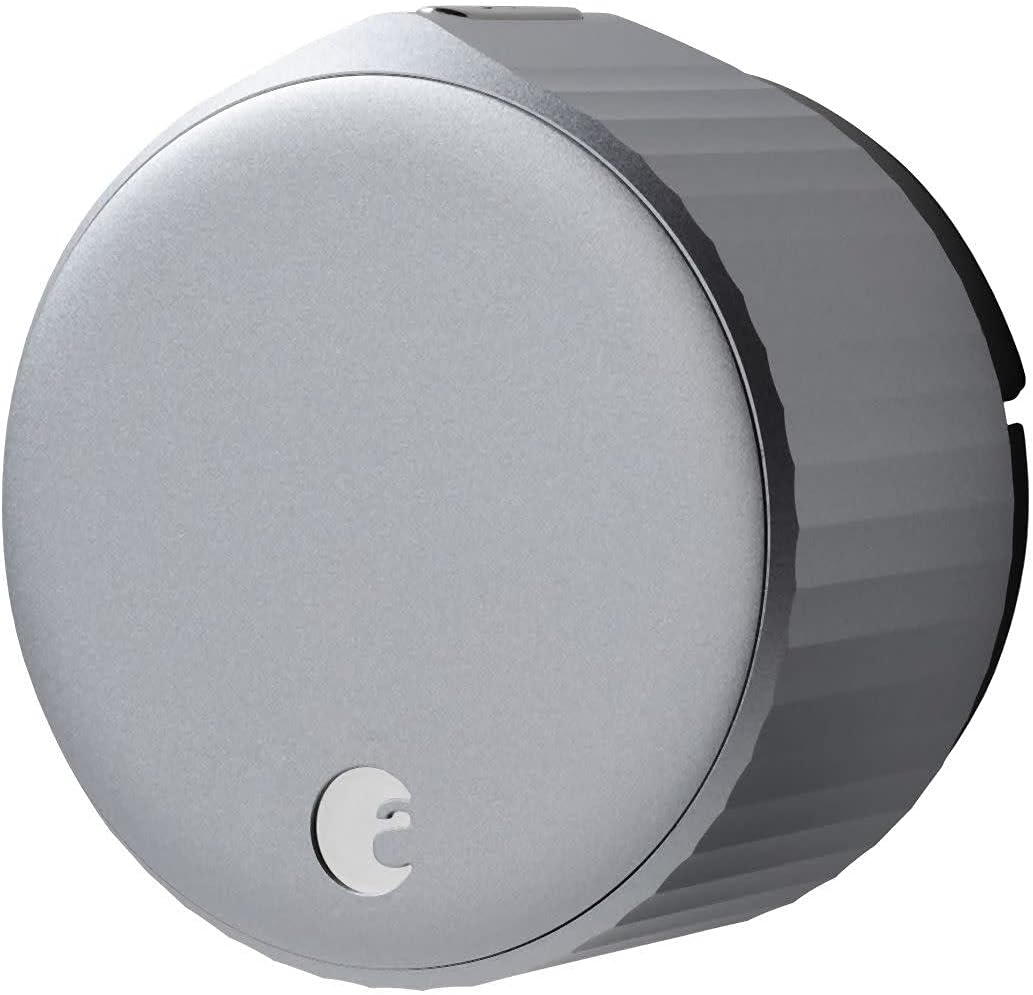
Figure 9
- It can be installed over your existing deadbolt
- Compatible with most single-cylinder deadbolts
- Comes with a DoorSense sensor that detects when your door is closed and locked
- Compatible with Amazon Alexa, Apple HomeKit, Google Assistant
- Supports Z-Wave, Bluetooth and Wi-Fi connectivity
- Supports two-factor authentication for added security
- Free app for iOS and Android devices
- The web-based interface is available for use on computers
- Allows you to lock and unlock your door remotely, create virtual keys for guests, and monitor access history using your smartphone or computer
- Provides real-time alerts and notifications for activity at your door
- Includes a tamper alarm
- Battery-operated
- Comes with a 1-year warranty
2. Schlage Encode™ Smart WiFi Deadbolt
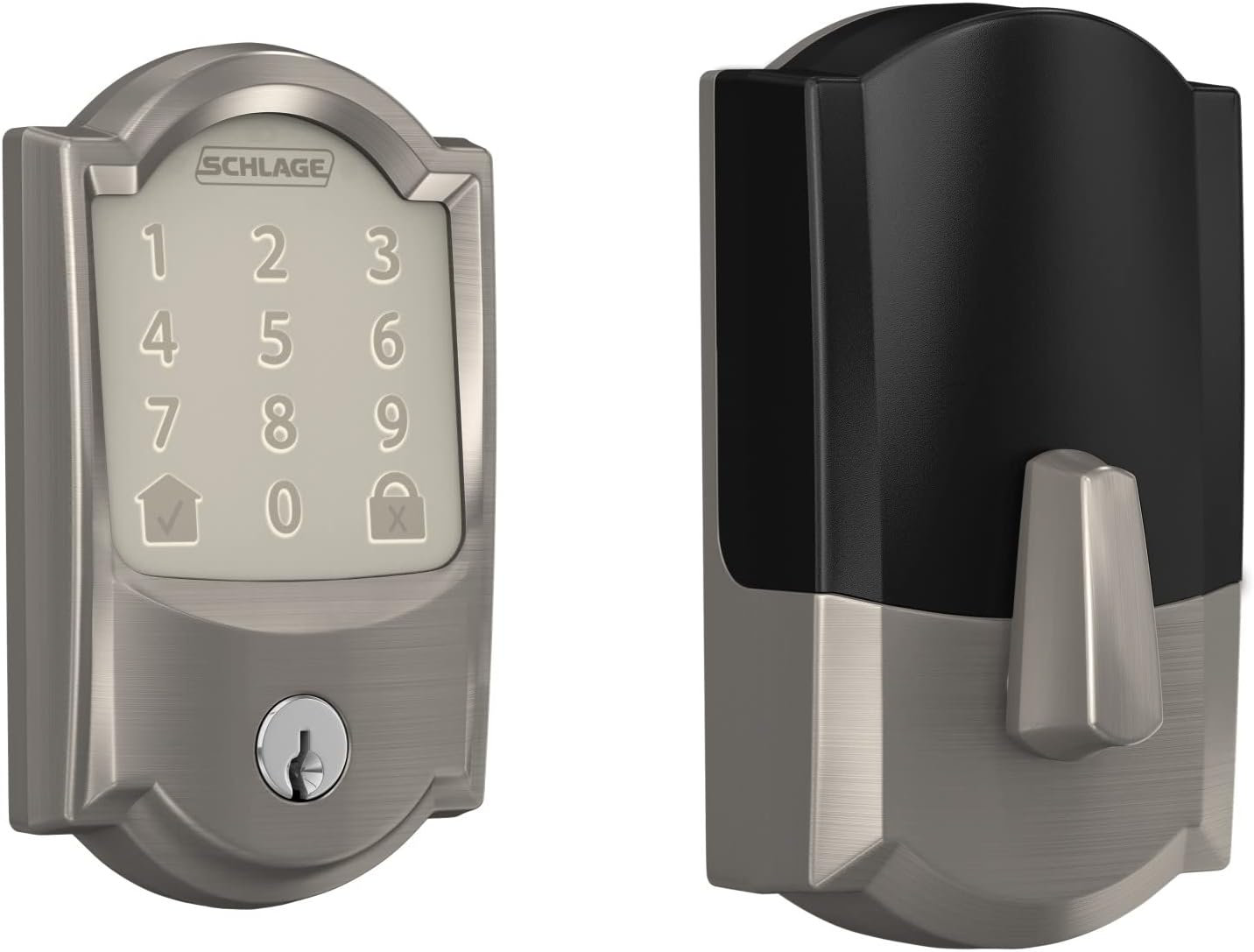
Figure 10
- Compatible with Amazon Alexa and Google Assistant
- Supports Wi-Fi connectivity
- Offers optional one-time access codes that can be sent to guests via text or email
- Supports the creation of up to 100 access codes that can be managed and customized in the app
- Supports two-factor authentication for added security
- Can be integrated with other smart home devices such as smart thermostats and security cameras
- Works with the Schlage Home app and Key by Amazon apps (available for free download on iOS and Android devices)
- The web-based interface is available for use on computers
- Allows you to lock and unlock your door remotely and monitor access history
- Provides real-time alerts and notifications for activity at your door
- Includes a tamper alarm
- Battery-operated
- Comes with a 3-year electronics warranty and a limited lifetime mechanical and finish warranty
3. Kwikset SmartCode 914

Figure 11
- Compatible with Amazon Alexa, Samsung SmartThings, and Vera
- Supports Z-Wave Plus technology
- Features a backlit keypad for easy use in low-light conditions
- Comes with a one-touch locking button for convenience
- Supports automatic door locking after 30 seconds to improve security
- Can be integrated with other smart home devices such as smart thermostats and security cameras
- The Kwikset app is available for free download on iOS and Android devices
- The web-based interface is available for use on computers
- Allows you to lock and unlock your door remotely, create custom user codes, and monitor access history
- Can store up to 30 user codes for family members, guests, or service providers
- Provides real-time alerts and notifications for activity at your door
- Includes a tamper alarm
- Battery-operated
- Comes with a lifetime mechanical and a one-year electronics warranty
FAQs
Can Smart Locks be Hacked?
Smart locks are vulnerable to hacking, just like any technology connected to the internet or controllable remotely. The risk of hacking depends on several factors. These include the lock’s security, its hardware and software, and the attacker’s skills.
To lower the risk of hacking, it is essential to select a smart lock with solid security features, including encryption, secure authentication protocols, and regular software updates to address vulnerabilities. It is also important to update the firmware frequently and replace default passwords with strong, unique ones.
For remote access to the lock, it is advisable to avoid using public Wi-Fi networks and use a strong password for the lock’s associated app. In general, good security habits keep the risk low, especially with a trustworthy brand.
If Your Internet Connection or Electricity Goes Out, How do You Get into Your Home?
If your smart lock is battery-operated, it still works when your home’s electricity goes out. However, if your smart lock is connected to a hub or gateway that requires an internet connection, then you may not be able to control the lock remotely if your internet is down.
For hard-wired smart locks, you can still use a physical key to enter your home. Additionally, Bluetooth connectivity will still work with your smartphone when you are within range of the phone and lock to connect.
How Much Do Smart Locks Cost?
Depending on the brand, model, and features, a smart lock can cost anywhere from $50 to $500.
Conclusion
In conclusion, smart locks are an innovative and convenient technology that offers a variety of benefits for homeowners, property managers, and construction managers. With remote access, audit trails, user management, and integration with smart home systems, smart locks can enhance security and simplify access control.
For remote property and construction management, it is important to choose a smart lock that allows for both phone and computer control. While there are many smart lock options available, the best smart locks for remote construction managers are those that provide ease of use, security, and remote management capabilities. With the right smart lock and smart home system, remote management will be much easier, allowing construction managers to control their properties with ease from anywhere.
Planning a project in Philadelphia or South Jersey?
MatrixGC is a licensed Philadelphia general contractor (#43984). Learn about our whole-home renovations, see Philadelphia general contractor, or get a free estimate. Call (215) 501-7566.



0 Comments